PlaysoloistStringsViolin
Part · Western · Strings
№ 6779044746
Violin App Free Violin Tuner & Lessons for Adult Beginners
A free G–D–A–E violin tuner, then lessons with feedback based only on what the microphone heard clearly. When it can't hear you, it says so instead of marking you wrong.
The violin app that does not guess.

Tuning, listening, grading and import run on your iPhone, and your audio is not uploaded. No account, no ads.
For adult beginners and returning players. Soloist Violin starts with a free tuner that knows the violin: G–D–A–E and fiddle cross-tuning, an adjustable A4 from 415 to 466 Hz, drones and a mic check. Then play lessons and reviewed public-domain music in letters or real treble-clef notation with finger numbers. Wait Mode moves on only after you hold a clear pitch, and silence, noise and unclear notes are never marked wrong.
A free violin tuner, forever
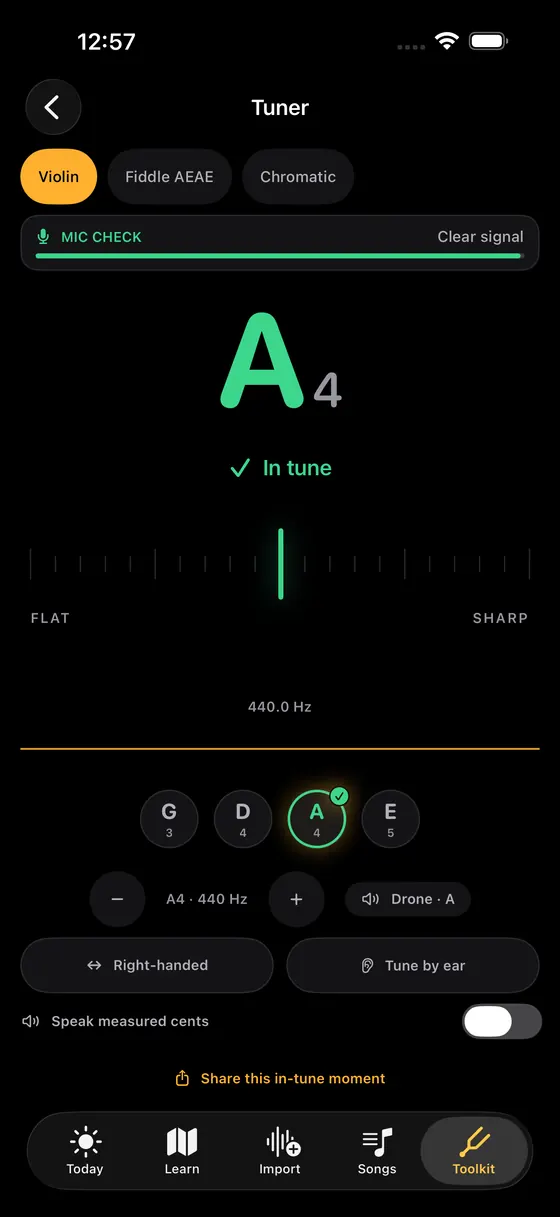
G–D–A–E with drones, A4 adjustable from 415 to 466 Hz, a fiddle AEAE tuning, a left-handed layout and tune-by-ear drills. It warns before risky E-string tightening and won't suggest a peg turn when the reading is uncertain or an octave off. Turn on Spoken feedback and a natural voice names the note and says whether it's in tune, or slightly or very flat or sharp, so your eyes can stay on the bow.
Feedback that abstains
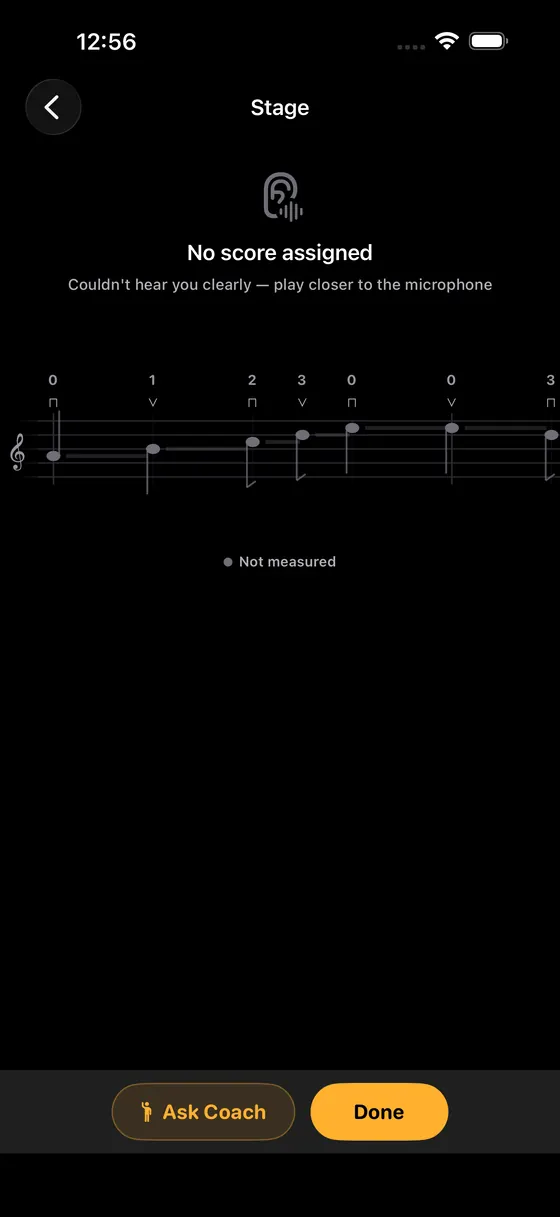
A take is scored only on the notes the microphone heard clearly. If it couldn't hear you, you see “No score assigned” and a tip to play closer, not a wrong note.
Intonation you can see
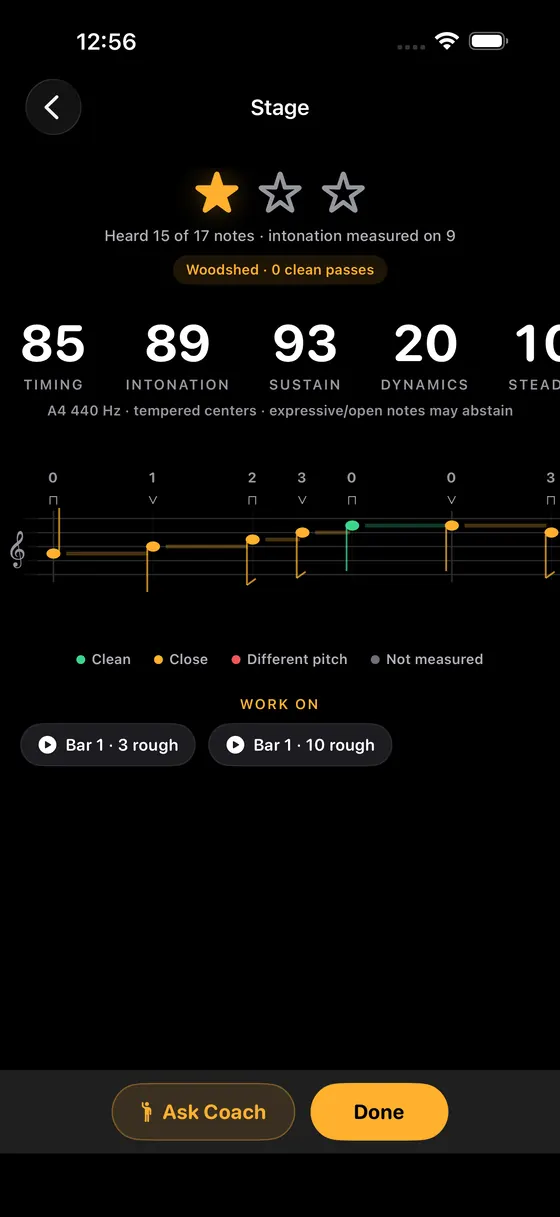
After a take: timing, intonation, sustain and dynamics scores, and a staff view marking each note clean, close, a different pitch or not measured.
Wait Mode
The music waits for you: it advances only after a clear pitch is held, so you can find each note at your own pace.
Woodshed for the rough bars
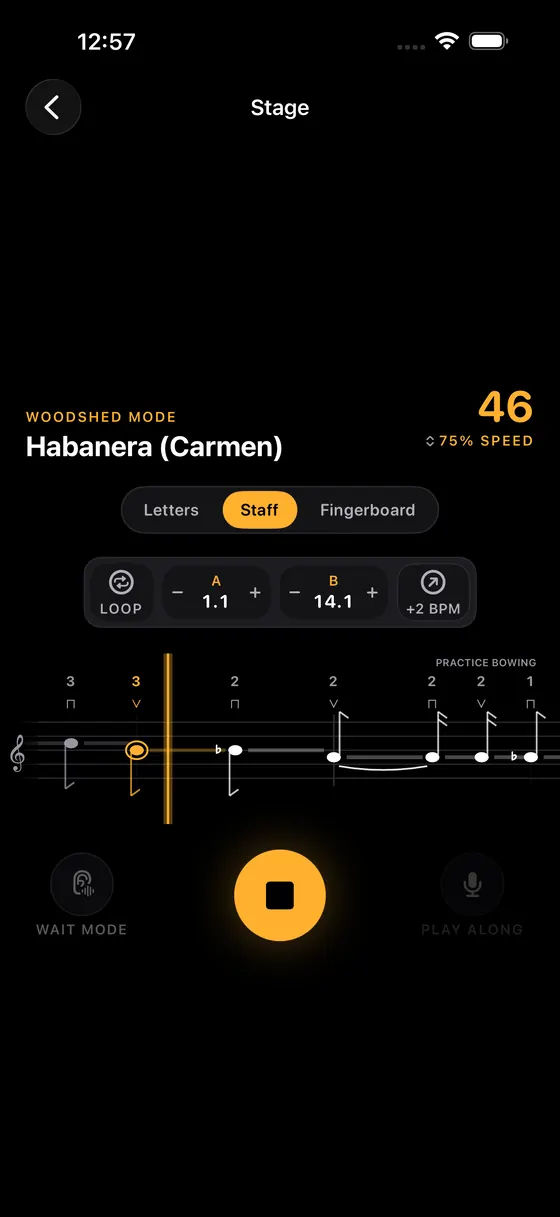
One tap loops a rough bar. A–B loops, a metronome, accompaniment, 50–120% tempo and a +2 BPM step after a clean pass.
Letters, staff or fingerboard
Read the same piece as letter names, treble-clef staff with finger numbers and bowing marks, or a fingerboard view.
Private song import
Turn a recording, a file or your humming into practice on your iPhone. Your audio is not uploaded. Three imports a month are free.
Three steps to a take you can trust
Tune and check the mic.
Tune G, D, A and E with the free tuner. The mic check shows a clear signal before you play.
Play the line.
Play in letters or on the staff. Wait Mode holds each note until you find it.
Read the honest result.
A clearly heard take gets timing and intonation scores and marks each note. An unclear take gets no score, so move a little closer and try again.
Real screens. Real practice.
Inside Soloist Violin, screen by screen.
Free charts, guides & references
Free guides for violinists: tuning G, D, A and E, practising intonation, the bow hold and the first-position finger chart.
Songs & free notation
110 public-domain and original works with full, readable notation — read them free here, then let Soloist Violin grade your take note by note.
Questions
Is there a free violin tuner app?
Yes. Soloist Violin's tuner is free with no ads: G–D–A–E and fiddle AEAE, drones, an adjustable A4 from 415 to 466 Hz and a left-handed layout. It warns before you tighten the E string too far.
How do I tune a violin?
Tune the A string first, then D, G and E. Use the fine tuners for small changes and the pegs only when a string is well off. Our step-by-step guide covers pegs, fine tuners and checking fifths by ear.
Will it help my intonation?
It shows, note by note, whether you were clean, close or on a different pitch, with an intonation score for each clearly heard take. It can't see your hand frame or bow, so many adult learners pair it with a teacher.
What if my room is noisy or I play too quietly?
The app doesn't guess. Silence, noise and unclear notes are left unmeasured rather than marked wrong, and a take it couldn't hear gets no score and a tip to play closer.
Does it read standard notation?
Yes. Every piece can be shown as treble-clef staff with finger numbers, as letter names or as a fingerboard view.
Does my audio leave my iPhone?
Tuning, listening, grading and song import run on your device, and your audio is not uploaded. No account is needed. Soloist Coach, the optional practice chat, asks your permission before it sends the text you type to a third-party AI service, and you can turn that off in Settings.
What does it cost?
Soloist Violin is free to download. The tuner, drones, practice streaks, reminders, three imports a month and 5 Coach replies a month are free. Soloist Pro opens the full course, songbook, technique labs and unlimited imports. The app shows current prices from the App Store before you buy.
Can I pay once instead of subscribing?
Yes. Pay once with Soloist Pro Lifetime: one purchase keeps every violin lesson, song and Pro tool unlocked, and nothing renews. It comes first on the app's Pro screen. Lifetime keeps the free 5 Coach replies a month; a monthly or annual plan raises Coach to 500 replies a month.
More Strings
Free on the App Store
Tune up, then play your first clear note.
Download Soloist Violin free. The tuner, drones and practice streaks need no purchase. Pay once with Soloist Pro Lifetime to keep the full course, or choose a plan. See local prices in the app.
Get Violin on the App Store